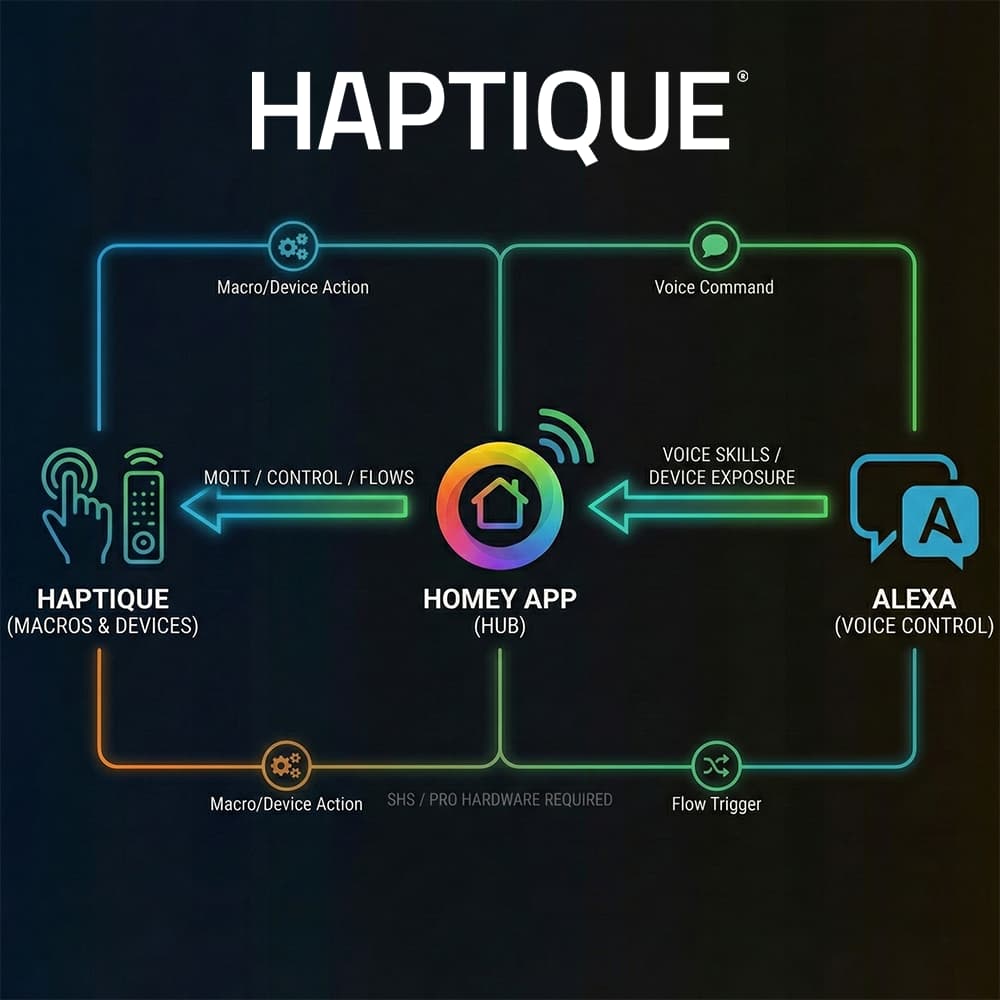
Exciting news! The Haptique app for Homey has been officially submitted and is currently waiting for approval.
For those who want to jump in early, the test version is available right now. This integration allows you to fully control Macros, Devices, and specific Device Commands directly through Homey.
Pre-requisite:
- You must have Homey Pro or Homey SHS running on your hardware.
- MQTT Server on Homey
 Test Link
 What can it do?
- Compatibility: Works with Homey Pro and Homey Bridge (SHS).
- Control: Full control over Haptique Macros and Devices.
- Advanced Commands: Specific device commands are accessible directly within Homey Flows.
 Guide: How to use Voice Control (Alexa)
You can control Haptique via Alexa by utilizing the Homey Skill. Here is how to set up full voice control, including specific commands like “Mute TV” or running Macros.
Step 1: Basic Setup
- Install the App: Install the Haptique test app on your Homey.
- MQTT Setup: Set up an MQTT Server on your Homey and configure your credentials.
- Configure Haptique: Go to the Haptique App Settings within Homey and enter the MQTT server details you just created.
- Add Device: When adding a device, you will see three options. Choose the one that fits your needs:
- Haptique RS90: Select this if you only need device status and battery level.
- Haptique Macro: (Recommended) Select this to control your Haptique Macros.
- Haptique Device: Select this to control specific devices.
Once you have added your Haptique Macros or Devices in Homey (Step 4 above), you can easily expose them to Alexa.
Basic Voice Control:
- Enable the Homey Skill in your Alexa App.
- Link your Homey account.
- All your Haptique Macros added in Homey will automatically be discovered by Alexa.
- Command: “Alexa, turn on [Macro Name]”
Advanced: The “Flow” Trick (For Specific Commands) Some specific commands (like TV Mute) are best handled via Homey Flows.
- Create a Flow: Create a flow in Homey that triggers the specific Haptique command (e.g., “Mute TV”).
- Favorite the Flow: Important! Mark this Flow as a “Favorite” in Homey.
- Discover: In the Alexa App, run “Discover Scenes.” Your favorite Flow will appear as a Scene.
- Routine: Create an Alexa Routine to trigger that scene (e.g., “Alexa, Mute the TV”).
Let us know if you run into any issues setting up the MQTT connection!