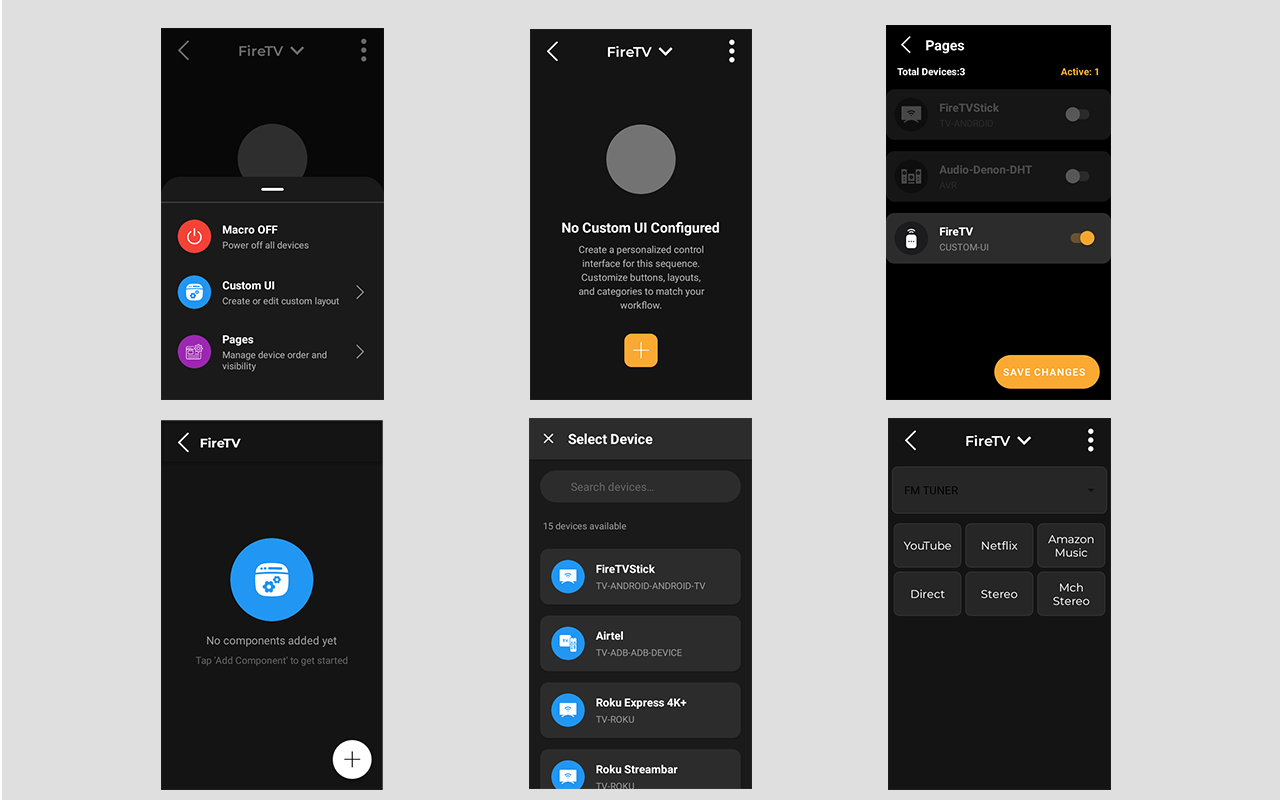
I have the new IR hub and it is working well to add IR remotes by learning each button, however, I seem to only be able to add the buttons I learned within sequences. I would like to be able to tap on one of the IR devices I added to a room and use a custom button layout on the touch screen. I only seem to be given a generic layout based on the device type. I would like to be able to customize the button layout for the custom buttons I learned. Also it would be nice to map the custom IR commands I learned to the physical buttons as well.
Related to this; in the sequences using the custom IR devices, the same thing happens when I try and swipe up to switch to those devices, the button layout is fixed and I cannot customize. I have an IP device with custom URLS for each command and those show up in the device as individual buttons both on the device and within sequences. I would like to be able to do something similar with the custom IR devices. It would also be nice to re-arrange them to create a custom virutal button layout and also map to the physical buttons.
The use case here is that say I have a dvd player that I added a custom IR device and learned all of the commands, there may be some lesser used commands that I do not or can not assign to physical buttons in a sequence, but once in a while I would need to issue those commands, I am unable to do so when pulling up the device in the sequence (or directly on the device icon). I simply get a generic button layout that does not have the command I need.
We are working on this part we learnt from AVA remote recently to offer widgets such as cursor with back and home, Transport, buttons, toggles switch. So you will be able to create a whole new page with this.
At the moment you can customised the keypad but not the touchscreen. All the 24 buttons can host any of the commands so use your new command and map it to last three free buttons. When you enter a Sequence or Macro the custom Keymapping gets activate.
With the new updated on the RS90. You will have the option to design a Custom UI. We have included few widgets or collection of buttons and commands used jointly but you can go all out and add each command individually. The grid currently is fixed for the 3 buttons in a row. You can also disable the fixed UI pages now.