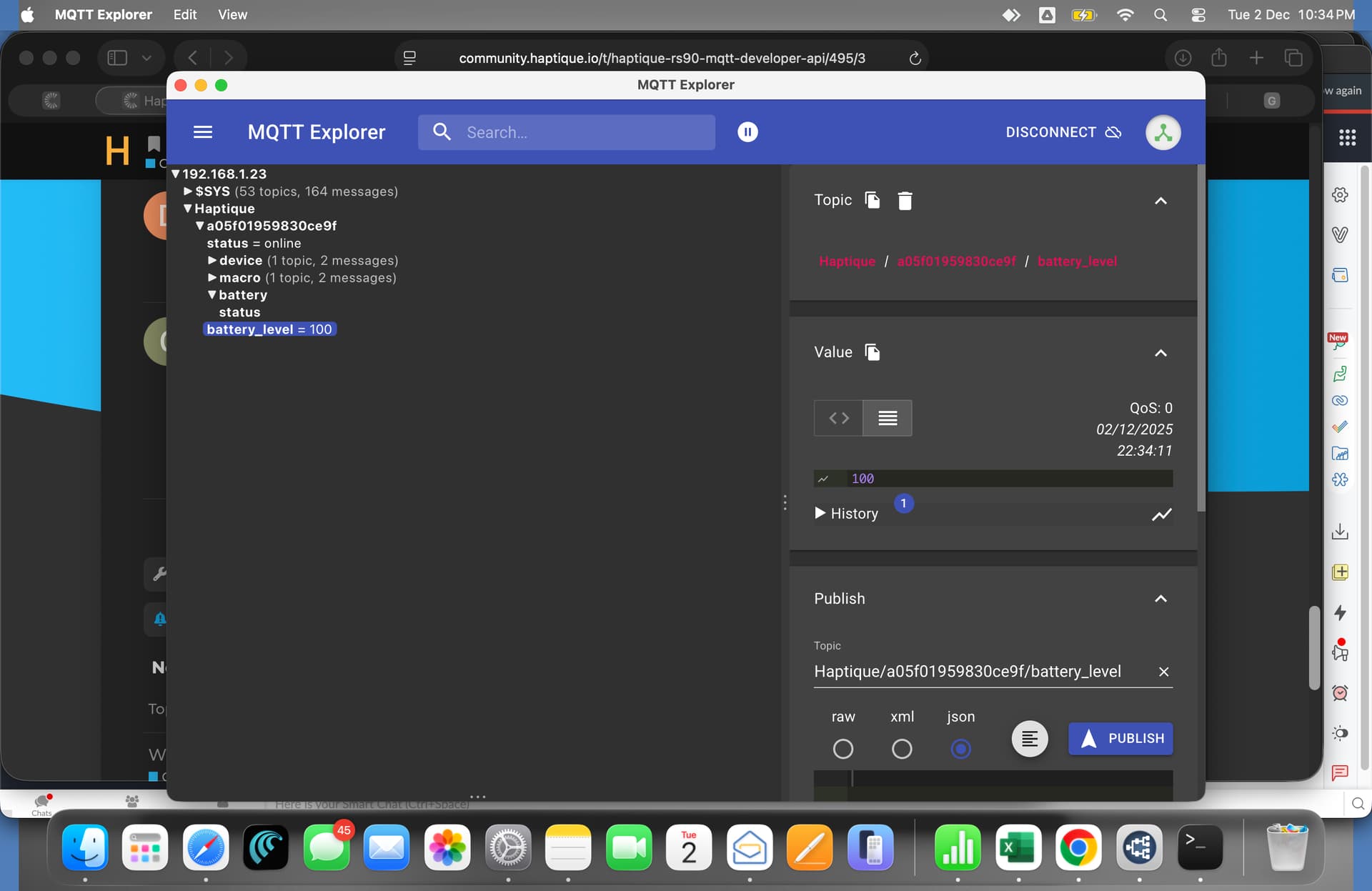
This document outlines the MQTT topics and payloads for integrating the Haptique RS90. Note: The RS90 uses Retained Messages for state and configuration. You do not need to send “Get” commands. Simply subscribe to the topics below, and the broker will automatically deliver the current data immediately.
1. Device ID (Auto-Reported)
Topic:Haptique/{RemoteID}
Type: Subscribe
Retained: Yes
2. System Status (Auto-Reported)
Connection Status
The Haptique updates this topic automatically when it connects or disconnects (via Last Will & Testament).
Topic:Haptique/{RemoteID}/status
Type: Subscribe
Retained: Yes
Payload:
online
offline
3. Resource Discovery (Auto-Reported)
The remote publishes its configuration to these topics upon connection.
I’m currently working on HA integration, but on my side i don’t have battery level in MQTT haptique Topic. Is there a particular settings on Haptique remote to publish the battery level value ?
I’ve seen that MQTT now is implemented but it asks for a username and password while I host my own MQTT it does not have a username and password. Could this also be made possible for the haptique connection?
The credentials required are of the broker to make a secure connection. Imaging anyone accessing your Haptique to connect to any random broker on the network. They can control Haptique with ease. So just setup your broker with credentials and add it on the config app settings.
The MQTT server is in my own network and external acces is nog an issue so I like to have the choice to use it without having to fill in my credentials.
I do have other things working throud MQTT without having to use credentials and that’s completely save.
Clarification Needed for RGB Ring Light API
The MQTT API documentation for the RGB Ring Light feature is ambiguous and needs clarification:
Current Documentation:
7. RGB Ring light
Toggle RGB ring default animation.
Topic: Haptique/{RemoteID}/ledlight/on (on/off)
Type: Subscribe
Payload: JSON
{seconds 1-10}
Questions:
Topic interpretation:
Does (on/off) mean the payload should be “on” or “off”?
Or does it mean there are two separate topics: ledlight/on and ledlight/off?
Or is it just indicating the topic controls on/off state?
Payload format:
Should the payload be a JSON object like {“duration”: 5} or {“seconds”: 5}?
Or just a plain string/number like “5” or 5?
Can we send “off” as payload to manually turn off the animation?
Is there an “on” payload option (with default duration)?
Behavior:
Does the RS90 automatically publish back to this topic when the animation ends?
Or should the integration track the duration and update state locally?
Implementation scenarios:
Scenario A (number only):
Payload: “5” → Activates for 5 seconds, then auto-stops
Payload: “10” → Activates for 10 seconds, then auto-stops
No manual “off”
Scenario B (number or on/off):
Payload: “5” → Activates for 5 seconds
Payload: “off” → Manually stops animation
Payload: “on” → Activates with default duration (?)
Scenario C (JSON format):
Payload: {“seconds”: 5}
Payload: {“state”: “off”}
Please clarify the correct usage to ensure proper integration implementation.
Timer is optional, you can send the topic for on and by default RGB will stay active for 10 seconds. If you want to shorten this time use Payload as value from 1 to 10. Off timer is also optional because you don’t want to target the time to Off after given time
I suggest to just implement On trigger and Payload adjustment rest Off can be ignore to build the integration.
New button entity button.rgb_ring_light for quick RGB activation (5s default)
Service haptique_rs90.trigger_rgb_light with customizable duration (1-10 seconds)
Smart local timer auto-updates state after duration expires
MQTT implementation uses retain=false to prevent unwanted replay on RS90 reconnect.
Since OPUS 1 has now been released, please add another MQTT topic for App Focus. This MQTT topic should transmit the active app currently displayed on the RS90’s screen.
Only by combining knowledge of the active app with the keystrokes is it possible to meaningfully process the keystrokes in an external system or trigger specific actions, depending on which app is currently displayed.
First of all, thanks for providing the initial MQTT support for the RS90. Being able to trigger the default RGB ring animation via MQTT is already very useful and works well in practice in first tests.
While exploring the RS90 further, I noticed something interesting that I wanted to ask about:
On the RS90 itself, there is an internal test/diagnostic app (“检测工具 / Test Tool”), which includes an RGB test menu.
In this menu it is possible to:
continuously send red
continuously send green
continuously send blue
continuously send white
generate a random color
run a cyclic animation (yellow / green / blue / white)
explicitly stop the RGB output
So it seems that the RS90 firmware already supports:
setting specific RGB colors,
different RGB modes/animations,
and a clear “stop/off” command.
With the current MQTT API (v1.1), however, it looks like MQTT can only:
toggle the default RGB ring animation, without selecting color or mode.
My question is therefore:
Are there plans to extend the MQTT API to expose more of the existing RGB functionality, such as:
setting a specific color (RGB / hex),
selecting a mode (static, cycle, random),
and explicitly stopping the RGB ring?
This would make the MQTT integration even more powerful for home automation systems like IP-Symcon or Home Assistant, especially for visual feedback (notifications, errors, charging state, etc.).
Thanks again for the great work on the RS90 MQTT API, and I’m happy to test or provide feedback if needed.
You are right, we just added support to trigger RGB default animation. What you are expecting will follow in the next updates as we push more features on the MQTT. One of the them is to allow to open Android Apps using Json payload. Which we have already discussed internally. The flow for the apps will be, subscribe to a Topic sending App package name first. Next Publish a topic specifying app package name in Json to launch it.
The same way we will also open RGB control. But please note, there will be few limitation to handle colours individually as the RGB firmware is written in a different system STM32 which is fixed and we cannot change it OTA. So whatever is possible we will expose it to the MQTT.