I created a Sequence for watching my AppleTV 4K. The “ON” steps are 1) Power on the TV (Sony X900H), 2) Power on the AVR (Sony DN1080), 3) Power on the AppleTV. When I activate the sequence on the RS90, the remote displays the Power On animations, but none of the devices turn on. Once the sequence has started, I can select each device on the remote and power them on separately. Is there a way to simply start my sequence and have everything turn on automatically?
Can you share a screenshot of On sequence order here.
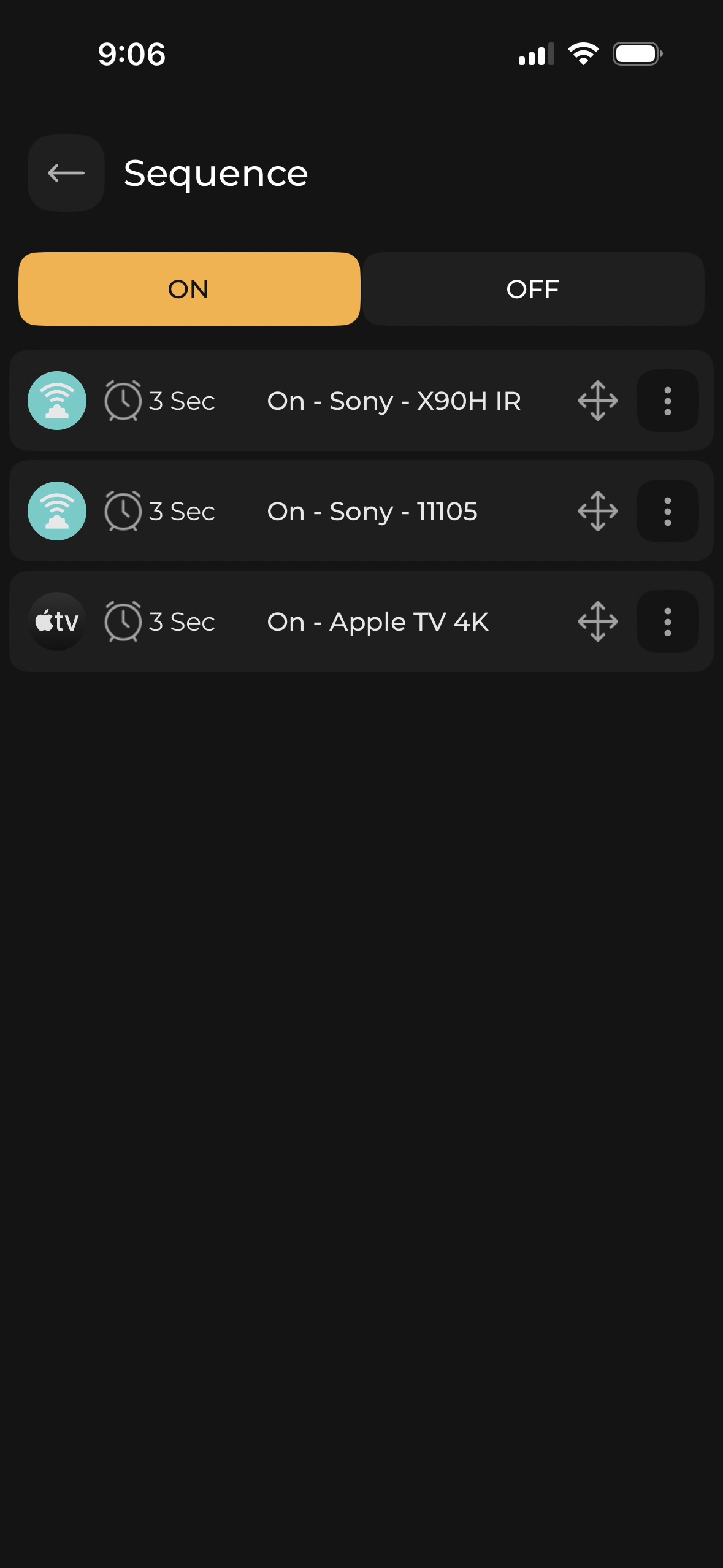
Got it.
The issue is that the system thinks that devices are in On state and thus refuse to turn them on. Because last time you used manual switching.
If you could fix the state by keeping everything off, run the Off sequence and physically also turn off all the devices.
Next time you try the On sequence, it will work.
To address this we are bringing an option called FIX which will let manually fix power states of devices if the toggle is reverse my any chance.
I still am having no luck. I’ve selected each device and was able to power them on individually via the RS90, and power them off individually. But when I activate the macros, the TV and Apple TV turn on, but not the AVR. When I turn the AVR on, then power off the macros, only the AVR turns off. The AppleTV and Sony TV remain on.
Power On fix will follow in the next update.
I’m having similar issues I think. My problem is that my sequence starts a PS5 and other devices - amp, blinds, tv, RGB lighting etc.
I can also launch a near identical HA sequence with an Alexa voice command.
HOWEVER as I’m using my PS5 controller/wheel by definition following this, when I put the PS5 into sleep, Home Assistant polls for this and shuts everything down in orderly manner, opens the blind etc. this is exactly what I want, ie I don’t want to go looking for another controller to shut everything down.
Problem is your ‘on’ sequence may or may not have run depending on whether I started it with voice or Haptique, either way your ‘off’ sequence never runs which leaves everything in a mess. I’ve been grappling with this all day and only just realised that this is what’s happening after reading this post.
So my use case is I want discrete ‘on’ commands (not toggles) for all devices and the macro to just fire once on demand and then end gracefully. Ie not stay in a running state or require the ‘off’ state to be run - is this possible? Could the ‘off’ section be empty, and invoked automatically At the end of the macro for example?
Or actually, now I know what’s happening, I’ll just get Haptique to trigger the HA sequence with MQ and I wont use your macro at all.
Could do with some better documentation of this functionality though, it wasn’t clear what was happening, it just looked like your macros are hit and miss TBH.
I’m assuming they aren’t state-aware then? You’re just assuming that if you’ve fired off an ‘on’ with no subsequent ‘off’ that device must still be on? Is that right? Ie you’re not querying actual state?
Macro has On and Off Sequence which also includes Infrared and RF commands, which are state aware internally like Haptique remembers it sent On so infrared devices are in On state. No data is coming from these devices, what state they are having. If they are turned Off by any other way, Haptique is now out of sync. To address this just include turning Off Macro via HA(Integration).
If HA triggers the Automation to turn off everything as in your case it should also include turning OFF Haptique Macro. Just make sure there are no commands on the Haptique Off sequence so you are good. This way you turned Off Haptique running macro and system is in sync.
You will need MQTT broker on your HA and credentials to be added on the Config app.
If you want the Macro to work like HA Scene, which is a state of devices It is not available on Haptique currently. But we are considering an option to have sequence without Off commands which will not require to be turned Off by default. This can be one feature added to the sequence flow.
We are testing the Fix button on Haptique. It does the work to fix the state of system(for Haptique’s knowledge).