Hello, is it correct that the Yamaha Network Receiver R-N803D is not working, even if it can be connected via IP.
Is it based on Musiccast protocol?
Hello ccsfounder, yes it is. You can use the Yamaha Musiccast App to control the receiver.
1 Like
Yamaha has SSDP device discovery protocol which is implemented in the config app. If you can tell us more, does the device gets discovered in the config app?
I have a Yamaha RX A3080 which connects via ip then completely fails to do anything so I ended up connecting via IR to make it work. As others have suggested, I think it’s time for a rethink now. Your hardware looks promising, your software is just a mess. I know it’s early days etc, but you’re just barking up the wrong tree, the way you think this will work is just flawed.
IMHO the best thing you can do is look to something like Philips pronto which offered full customisation of nearly everything. I don’t want to use a mix of phone and device like this, in-fact I don’t think anyone does? Have a proper browser based config utility with a device emulator, use something like html or python and let us do our own thing to configure everything the way we want.
Currently when I match a device to ir code, I’m stuck with your choice of soft keys which are just hopeless - why duplicate hard keys here and waste space?
I’ve held back commenting until now, but it’s been a while and I’ve still got an ornament - is anyone actually able to use their device? I know I can’t. Each software/firmware update I have another go but just end abandoning it again.
I have everything in my system working perfectly with Home Assistant if I could just map your device to automations and scenes in HA that would make my Haptique actually useable and useful, you’ve done some of the work for that already, just go a little further and at least I could a actually use your machine then as PS5, AV, home automation, blinds, lighting etc is already cracked in HA you don’t need to do it again.
Sorry, but this just isn’t going to work the way you are heading IMHO.
Hello, I was now able to detect the receiver in the network. I simply had to use WLAN instead of wired LAN. However, after connecting, none of the keys of the Haptique remote is working just like Nickedw described. Unfortunately none of the Yamaha remote codes is working either. My Network Receiver is not old stuff, since it can handle Spotify and many more provider.
Thanks for the honest feedback, past Monday, we already had a meeting on this. The current Macros don’t have UI. But have been saying it will have custom UI. You will be able to design pages, once you enter the Macros it will be visible. Also the device UIs will be available for you to select on/off for example Apple TV UI is currently only visible when you dive in to a device via Rooms.
We have identified two changes to be made.
- Change the way rooms looks(List view)
- Offer UI under pages under Macros.
We are taking reference from AVA remote’s slides feature.
Also the webpage is under development which will allow you to add Infrared codes manually as we are ditching the current database as it is not turned out to be competitive.
For the Home Assistant support we will add more entities to import in Haptique. Already scenes can be called under sequence or directly mapped to the rooms.
What you mentioned about adding Haptique as device in HA to trigger something is what we need little help with. Should we expose our sequences to HA over local Https? or should we build an Add on in HA to handle our entities such as devices, sequences etc?
I think you should have Haptique remotes appear as remote/select entities in HA (like Harmony hub based remotes do). That way you have two-way support. For example, you could have an HA automation that sends pause to Haptique if the doorbell rings AND in the other direction have a change in sequence (or simply turning the remote on/off) trigger an automation. This would all be handled in HA and could be in addition to your current websocket support.
OK for my use case I have several Home Assistant scripts that execute a stack of commands - master power, amp, tv, UHD, games machines, blinds, lighting, climate etc. these are triggered by Alexa voice commands currently.
Some of these integrations you have, most you don’t. If I could simply map these to soft buttons on my Haptique that would meet 90% of my needs and actually wouldn’t be a bad solution for others.
These HA scripts present as scenes to Alexa currently. HA has an ‘expose’ tab for voice assistants which is how they integrate. Sorry but I’m not sure what happens under the covers to make this happen, ideally we need an expose to Haptique option too maybe?
Happy to share my setup in more detail if it helps.
Thanks for your prompt response and taking my feedback in the spirit it was intended.
You’re so close to having a great product, happy to help if I can I’ve been using and refining products like this for 30 years since the very first and have owned and lived with most things during that time.
Also, I’m not really sure about the rooms idea either.
I can only speak for myself, but I only need Haptique for a complex environment, my cinema room in my case.
Everywhere else modern tv remotes handle standard directly connected devices happily with CECI and where they don’t I just have triggers and listeners in HA coupled with presence sensors for lighting, climate etc.
An AV control device only makes sense in the room you are physically in. Haptique is quite bulky with a short battery life, are you really going to carry it around from room to room ( as well as your phone most likely) then go looking for it in other rooms when you inevitably leave it behind, likely find it’s flat, etc, etc. I know I’m not, plus I don’t need it anywhere else anyway for the reasons above.
Rooms are fair enough on phone apps as a phone is always with you. Your device isn’t.
Haptique comes into its own when many devices are routed through an AV amp or controller to TVs and or projectors etc which standard remotes can’t handle well or at all.
So IMHO you could have a really much-needed enthusiast product here, which although niche would sell well aimed squarely at this market. Let’s be blunt people who do this have money to spend by definition too which is no bad thing from your perspective.
I fear trying to make it a general consumer product for all, although with obvious commercial attraction, is asking too much right now.
I also don’t think anyone is going to use this in a vacuum either, I suspect we all have other apps and systems that do some or all of what you’re attempting, plus your usability is so far off consumer friendly it’s a mountain to climb. Top marks for ambition, but I just think you’ve got too far to go. Sorry.
Maybe I’m biased but I think Home Assistant could really help here, a tight integration with them could be massively mutually beneficial. They have cracked everything you are grappling with mostly, but lack a physical device. The ability to deliver their rich functionality on a real physical device with fully mappable hard keys and a flexible touch screen, Ip, ir and Bluetooth would be amazing.
Please take this in the spirit it’s intended, I really want you to succeed, but I would rather tell you hard to hear things now when you are still in a position to do something about it.
Bonne chance!
1 Like
I very much agree with this.
I have spent a lot of time setting Home Assistant up to do everything I want but not really a fan of the touchscreen interface on phone/tablet. What I really want is a hard button device I can use in a dark room to use as the interface instead and I think the RS90 could be that device with a bit of development.
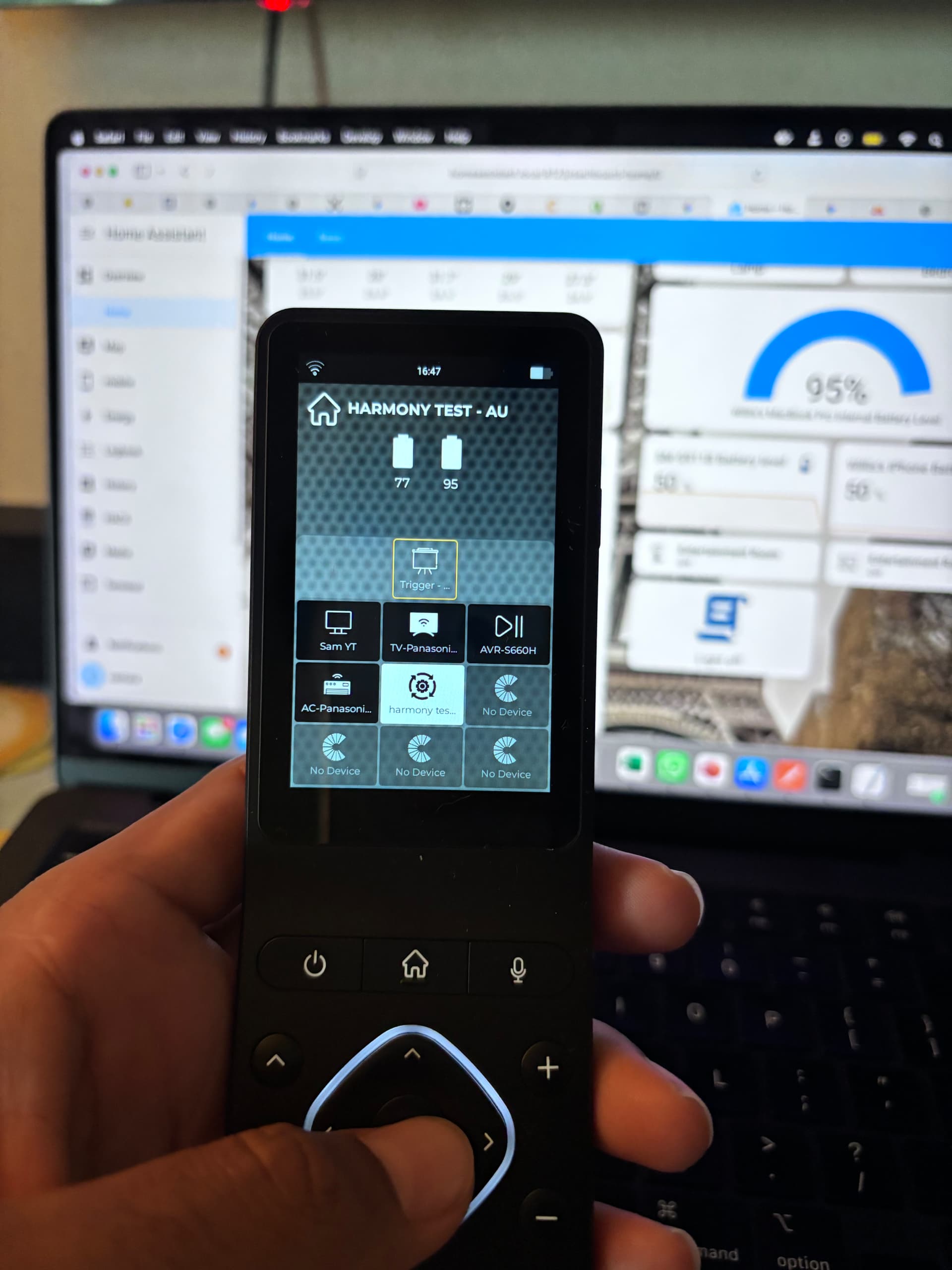
I just created a script, there was no way to call it directly from Haptique. So I created an automation in Home Assistant.
Simple>
Trigger
In my case When webhook payload is received(it is a dummy)
Then do>
Call service>Script
Now I can just call this automation via Haptique.
I have placed this Automation in room and created a Quickbutton to trigger using screen. It also can be trigger by pressing power button if you have selected the automation icon.
I am sure there are ways to handle what you want, it was already implemented in this case.